Version 1.11
The new version of the Shopify connector, v1.11, introduces several interface and functionality improvements:
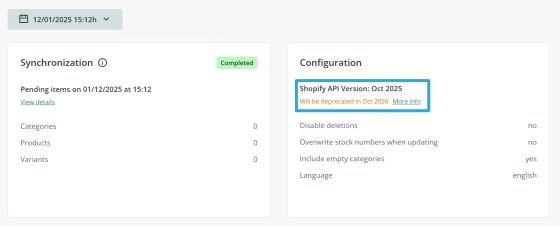
- Version v1.11 uses the Shopify API version October 2025, extending compatibility until October 2026.
- All supported fields for data submission are visible in the UI.
- New connectors are created using this version by default. However, it is not mandatory to migrate existing connectors.
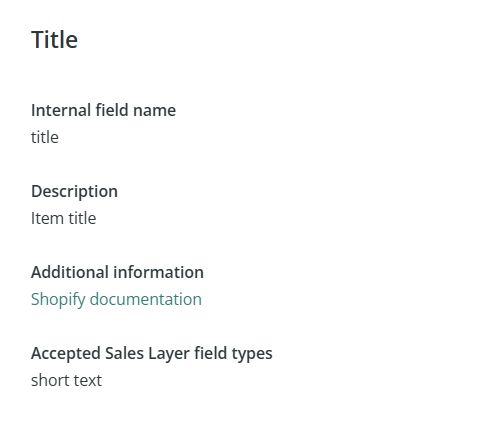
- All fields include help-information modals with configuration guidance, links, and accepted values.
- Fields have descriptive names to make mapping easier. It is not necessary to know Shopify’s internal/accepted field names. If you migrate a connector with an existing configuration, no changes in mapping are required, as the connector will automatically adjust the names.
- No new permissions (scopes) are required.
- Repeated fields in Variants, found under the Products tab, are intended for the use of data without variants.

Note: All the changes described in this article are available in the connector starting from version 1.11. If you would like to test them, please contact our support team through the usual channels.
Products
A new status called unlisted is implemented, which makes the product accessible in Shopify only through a direct link. Products with this status will not automatically be available/visible in the store.
To send this status through the connector, simply use the value “unlisted” or “U”.
Metafields
Starting with this version, the file_reference metafield supports sending .zip files.
It is also now possible to send standard metafields, whose use ensures consistent and interoperable data across the platform, since Shopify’s search engine and certain native apps only index data stored in official standard metafields.
Standard metafields use the same data types as any other metafield (e.g., single line text, number integer, etc.), so sending them through the connector works as usual, always using the namespace and key defined by Shopify. These must match the official values in Shopify’s documentation. If custom values are used, Shopify’s native tools will not recognize the metafield.
Example of sending product EAN codes following Shopify’s specification:
- namespace: facts
- key: ean
- type: single_line_text_field
SEO Management
Starting with this version, the fields for sending SEO title and description are Search engine listing – Page title and Search engine listing – Meta description, created by default in the Categories and Products tables in the connector.

In previous versions of the connector, SEO data was assigned through the metafields global_title_tag and global_description_tag. Shopify now recommends using the direct fields listed above to ensure correct functionality.
Sales Channels Management
As of version 1.11, the info button for the Publishing – Sales channels field returns a list of all sales channels created in the connected store.

Available values for channel activation:
- all: Activates all sales channels created in the store.
- third-party: The connector neither publishes nor unpublishes items in any sales channel. Use this if you do not want to change channel configuration or if channels are managed externally (from Shopify/external apps).
- '|' combination: Send multiple values separated by '|'. For example, use this to send specific channels (Online store|Point of Sale).
- Publishing – Sales channels disabled: By default, the Point of Sale channel is activated (internally sent with the value “global”).
- No value: If the field is enabled and no value is provided, the connector will unpublish the product from all sales channels.

