Text Improvement Agent
The Text Improvement Agent helps improve existing text stored in your Sales Layer catalog.
You can use it to correct mistakes or refine the wording of content in the default language.
How to add a Text Improvement Agent
To create this agent:
- Open Agents from the left-hand menu.
- Create a new agent.
- Go to the Actions tab.
- Click Add action.
- Select Text Improvement Agent.
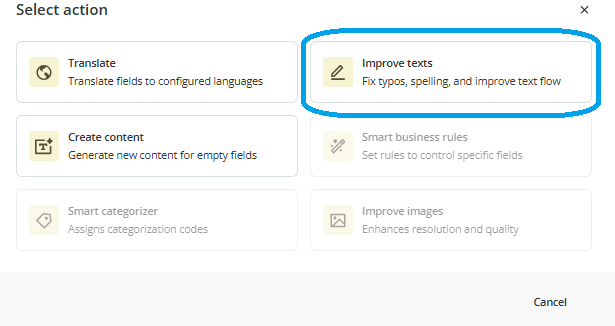
Choose which fields to improve
Once the action is selected, choose whether the agent should work on:
- all text fields
- specific text fields
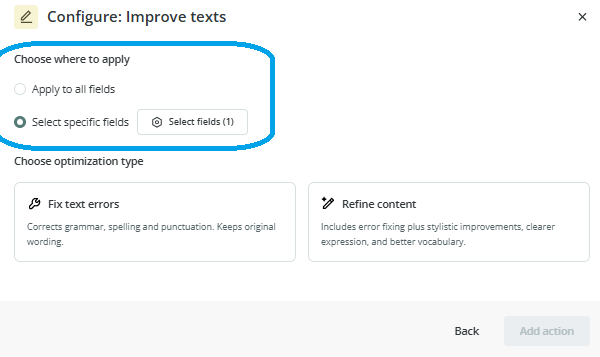
The improvements are applied to fields in the default language.
If you choose specific fields, you can decide exactly which content the agent should review.
Choose the improvement mode
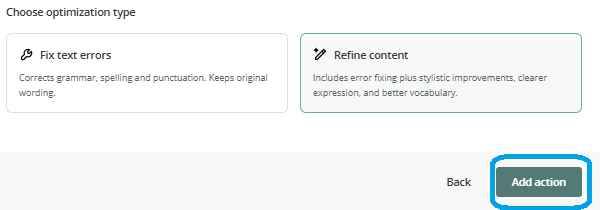
After selecting the fields, choose one of the two available options:
Fix text errors
This option corrects grammar and spelling mistakes while keeping the original content as close as possible.
Refine content
This option improves the writing style in addition to correcting possible grammar and spelling issues.
It is a better option when you want cleaner, more polished text instead of only basic corrections.
Finish the setup
Once you have chosen the fields and the improvement mode:
- Click Add action.
- Continue to the final step of the agent setup.
- Add the name and description.
- Create the agent.
If review is enabled, you will be able to check the suggested changes before applying them.
Common Use Cases
The Text Improvement Agent is useful when you want to:
- correct spelling and grammar mistakes in catalog content
- improve the quality of product descriptions
- standardize text quality across many items
- refine existing copy without rewriting it manually
Best practices
If you only need to clean up content without changing its meaning, use Fix text errors. If you want more polished wording, choose Refine content. For first tests, it is a good idea to apply the agent to a small set of items and enable review so you can compare the changes before applying them in bulk.

