When installing the plugin, the following fields are created in Magento in both the Products and Attributes menus:
- Sales Layer Product Identification
- Sales Layer Product Company Identification
- Sales Layer Product Format Identification
If you already have your Magento store running and want to start your first Sales Layer synchronization, these key fields will be empty. To avoid duplicates, a search will be performed among existing elements according to these rules:
- For categories, the search will be done by URL Key and then by parent ID if the category has been synchronized before.
- For products, the search will be done by SKU. If no matches are found, the search will be done by name.
- Variants will be searched by SKU.
If no matches are found, the items will be created.
Categories: Layout and Is Anchor
These two category fields are inherited from the default parameters configured when creating the Magento connector. If you need a different configuration for different categories, you can map this information in the connector using the Layout and Is Anchor fields in the Categories tab.
Products: Grouped products
One of the product types available in Magento is “Grouped Products”. You can send grouped products using the plugin.
Grouped products can be Simple Products, Virtual Products, or Downloadable products, taking into account item availability if stock management was previously configured.
As stated in the Supported and unsupported features article, downloadable products are not supported by the plugin.
You can group products using two predefined fields:
- grouping_product_reference_1: used to link to a related item field using a single reference.
- grouping_product_reference_X: replace X with a number equal to or greater than 2 if you want to send more than one product. Create as many fields as products you want to group in Magento.
By sending grouping_product_quantity_1 or grouping_product_quantity_X, where X is a number equal to or greater than 2, the stock quantity will be sent for the grouped product corresponding to the index written in the field name.
You can group variants using the same rule, but replacing “product” with “format” or “variant” in the field name.
Variants
Different products can have different attributes in their variants. However, it is not possible for the same product to have variants with different attributes. All variants under the same parent product need to have the same attributes filled in, otherwise they will not be synchronized.
For example, it is not possible to have one variant of a product with only “size” selected and another variant of the same product with only “color” selected. Both variants should have both “size” and “color”, or only one of these attributes selected.
Variants as products
Version 2.4.7 and above of the plugin gives the option to process Sales Layer variants as products in Magento. This means that variants in Sales Layer will be synchronized as single products in Magento.
To select this option in the Sales Layer plugin, set the following parameter to “Yes”:
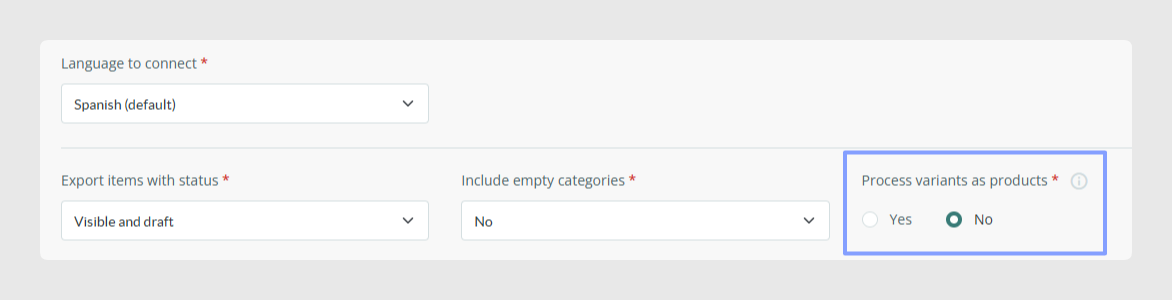
After selecting this option, the Products table in the Output Data tab will be automatically hidden, and existing product fields will be added to the Variants table. Previously placed filters in the Products tab will be removed to avoid hidden filters and make sure information is sent correctly.
Points to take into account about API operation
- On initial synchronization or connector refreshes, all products will be sent.
- When modifying a variant, all variations of the product will be sent by the connector filters. If a product in Sales Layer has 50 variants, changing one variant will synchronize all 50.
- When modifying a variant, the top-level parent element, the parent product of the variant, will be sent. If you want to send categories, we recommend changing the status and modifying them together with the variants you want to synchronize.
Points to take into account regarding the process
- All variant fields will be converted to product fields.
- Because the product table is not active in the connector, filtering items will only be possible at category or variant level.
- Variants will be synchronized with the categories associated with their parent products. If the option to send blank categories is set to “Yes”, all categories filtered by the connector will be synchronized. If it is set to “No”, only categories associated with products with variants will be synchronized. Remember that categories are mandatory on products to generate the main item in Magento.
- Additional fields for configurable attributes will be changed to product attributes, but the operation in Magento is the same.
- Grouped product fields should use this nomenclature on the Variant tab: grouping_format_reference_X or grouping_variant_reference_X, and grouping_format_quantity_X or grouping_variant_quantity_X. On reorganization, they will be converted so they can be processed as products.
- Sales Layer IDs for the variant will be changed to those of the product. If the Process variants as products option is disabled, either the existing products need to be deleted, or the Sales Layer attribute values need to be removed from the database. Otherwise, data will be overwritten during synchronization, which could cause duplication errors.
- Variants that you want to delete or modify will be converted into products to be deleted so they can be disabled.
Best practices
- Do not modify or delete the Sales Layer identification fields created in Magento. These fields and their values work as key fields in Sales Layer. If they are changed, products could be created again during the next synchronization.
- Magento does not allow products other than Simple, Virtual, or Downloadable products to be grouped. Check the product type before sending grouped products so the connector can process them correctly.
- Do not include the reference being processed as a grouped reference. Product grouping references cannot contain themselves. Variants of the same product cannot be grouped either.
- The grouping_product_reference_X field only accepts one reference per field. If the field contains more than one reference, only the first one will be sent to Magento.
- If you do not send the grouping_product_quantity_X field, the value will result in 0 in Magento.
Was this article helpful?
That’s Great!
Thank you for your feedback
Sorry! We couldn't be helpful
Thank you for your feedback
Feedback sent
We appreciate your effort and will try to fix the article