When you match fields for importing or exporting data in a connector, Sales Layer lets you choose between different field types depending on how you want that field to behave.
Normal type field
The Normal type field is the default option for most fields in a connector. Use it for standard field mapping when you do not need any special image, file, template, or title behavior.

Image or file type field
The Image/file type field is used specifically for image fields or file fields.
When you use it for an image field, Sales Layer lets you choose the image quality and the available format or size that you want to export.

Template type field
The Template type field lets you build content using conditions and HTML tags.
With Autocomplete, you can select any available field from the table and insert its content into the conditions or HTML tags created in the template.
With Output format, you can choose the format you want for the final result.
This field type is usually used when you want to prepare formatted content for web output.
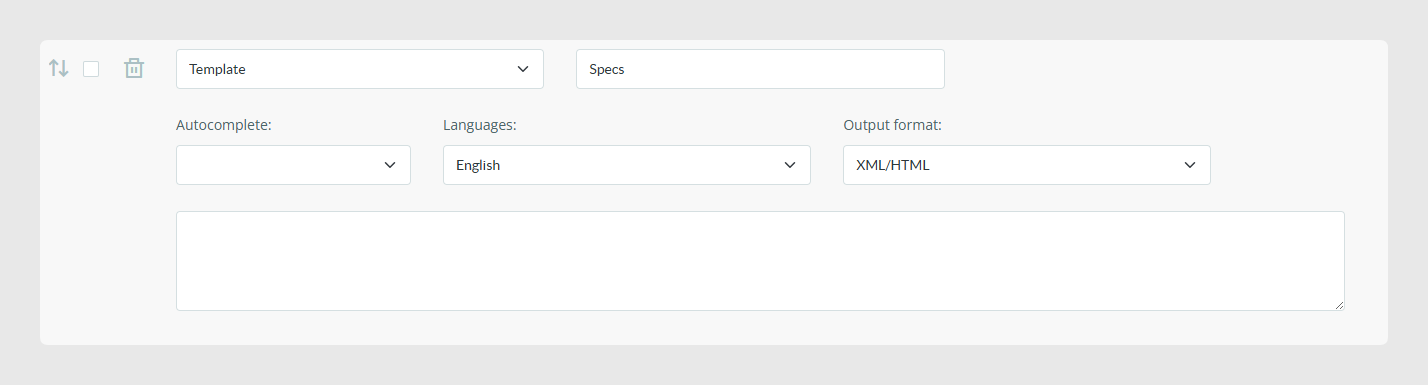
Example
{{IF product_decription}}
	<h4> product description: </h4>

	<p> {{product_decription}} </p>
{{IF END}}
Header type field
The Header type field lets you use a field as a title inside the connector output.
This field type is available in the Instant Catalog connector.

Best practices
- Use the normal type for most standard mappings.
- Use the image or file type when you need export options related to image quality, format, or size.
- Use the template type when you need to build formatted output with conditions and HTML tags.
- Use the header type when you want the field to work as a title, especially in the Instant Catalog connector.
- You cannot apply formulas to image/file type fields.
- You cannot apply formulas to template type fields.
- You cannot apply formulas to header type fields.
- If you work with several connected languages, the template type field shows an extra option so you can choose the language used in the template.
- Before activating a connector, test the output with a small sample to confirm that the selected field type behaves as expected.
Was this article helpful?
That’s Great!
Thank you for your feedback
Sorry! We couldn't be helpful
Thank you for your feedback
Feedback sent
We appreciate your effort and will try to fix the article