The PrestaShop plugin synchronization works as follows:
- First, the plugin asks Sales Layer for the items that need to be synchronized. These items are saved in the client server database as raw data pending synchronization.
- Later, the plugin starts collecting the items from the local database. After processing them, the plugin removes them from the raw data pending update.
Important
Starting with version 1.5.0 of the plugin, the progress bar groups the products to be updated together with their variants. They are no longer counted individually as in previous versions. When synchronizing a product, the progress bar increases by one unit, but that unit also includes the synchronization of its variants.
Synchronization status
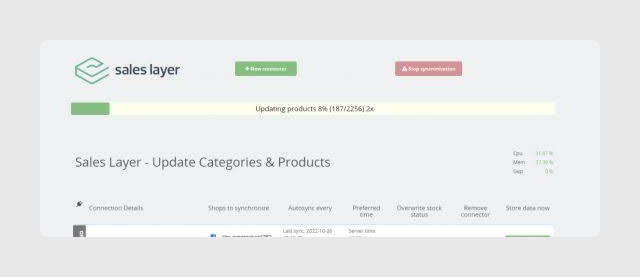
In the Connectors tab of the Sales Layer plugin for PrestaShop, you will find the synchronization progress bar. It shows the synchronization status, the progress percentage, the number of items to synchronize, and the number of synchronization processes running in parallel.
Process types
The plugin groups different types of data to optimize synchronizations. There are multiple definitions of an independent item:
- Categories to remove
- Products to remove
- Variants to remove
- Created or updated categories
- Grouped products with their variants, to be created or updated
- Orphaned variants without product in Sales Layer
- Sets of images to store or update, with a maximum of 7,000 images in one process
- Items whose only change is the stock field
For example, if there are 10 categories pending deletion and 3 categories to create, the progress bar will show a total of 13 items.
Starting with version 1.5.3, the plugin also includes information about image upload or indexing tasks in the same progress bar.
Parallelization of synchronization processes
The plugin uses the different data types to group the information to synchronize. It can have the following processes:
- A process to manage items to remove.
- A process to manage items to create or update.
- A process to manage images to store or update, in sets of up to 7,000 images.
- A process to manage items whose only change involves the stock field.
Multiple execution of synchronization processes
To synchronize items faster, the plugin has introduced several improvements that optimize synchronization speed:
- Version 1.5.0 introduced asynchronous item processing.
- Thanks to asynchronous processing, the plugin can execute several processes simultaneously and gain processing speed.
- The number of processes is calculated dynamically from the current CPU load. If the CPU is not heavily loaded, the balancer creates processes and catches up with them.
Best practices
- In versions before 1.5.0, the plugin does not group products with variants in the same item. If you migrate from a version before 1.5.0, the progress bar may appear slower.
- The number of processes currently running is shown in the progress bar itself. For example, “2x” indicates that there are two active processes.
Was this article helpful?
That’s Great!
Thank you for your feedback
Sorry! We couldn't be helpful
Thank you for your feedback
Feedback sent
We appreciate your effort and will try to fix the article