Creating metafields in Shopify
Metafields are used to store additional or customized information that is not available by default in Shopify, so they are considered supplementary fields that enrich the base data.
Sales Layer allows metafields to be synchronized from the connector, taking these points into account:
- The metafield must be created in Shopify before being sent from the connector.
- The metafield must be defined in Shopify.
In Shopify, go to Settings > Metafields and Metaobjects and choose the table where you want to create the metafield, such as Products, Variants, or Collections.
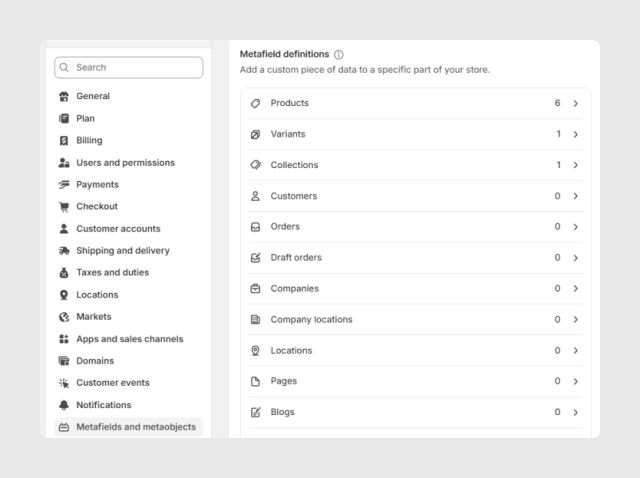
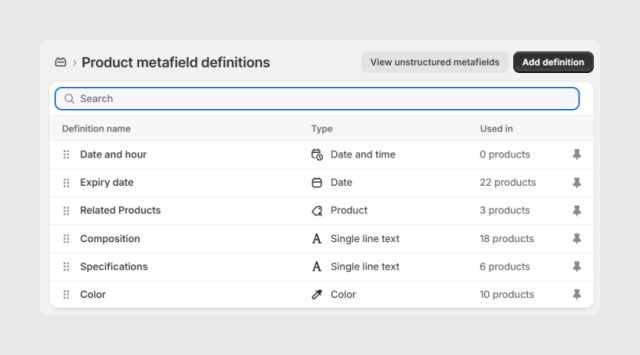
To create a metafield in the selected table, click Add definition.
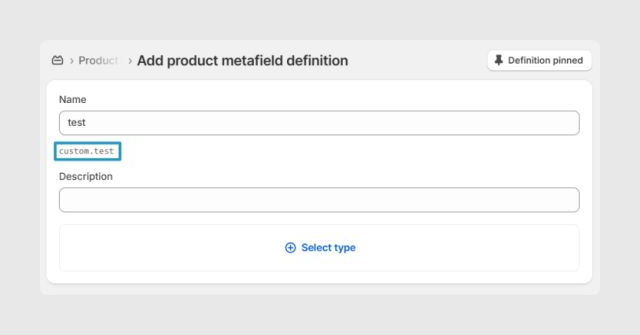
After entering the metafield name, the Namespace and key will appear automatically below. You can open and customize them if needed.
Finally, use Select type to define the metafield by choosing one of Shopify’s predefined options.
For more information about managing metafields, see Shopify’s official documentation: Shopify Help Center.
Note: From Shopify connector version 1.12.2 onward, namespaces that contain underscores can be mapped in Sales Layer by writing each namespace underscore as three underscores: ___. You can review the update in the version 1.12.2 article.
How to map a metafield in the channel
To assign a metafield in the Sales Layer connector, use this syntax:
metafields_<namespace>_<key>
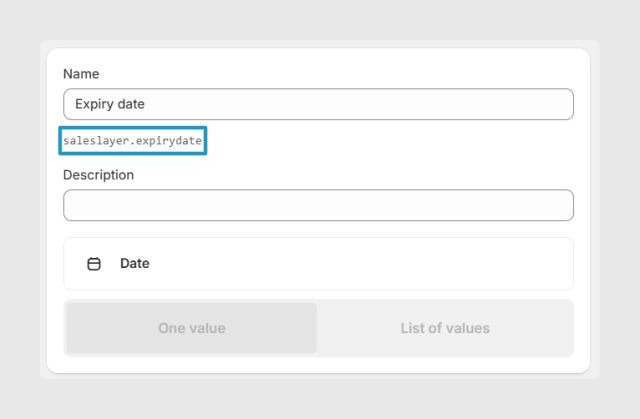
For example, if the metafield is configured in Shopify with the namespace saleslayer and the key expirydate, the field name in the connector must be:
metafields_saleslayer_expirydate
Another common example is:
metafields_global_title_tag
This is sent to Shopify as:
namespace: global
key: title_tag
Namespaces with underscores
From Shopify connector version 1.12.2 onward, namespaces that contain underscores are supported. To map them correctly, write each underscore in the namespace as three underscores in the Sales Layer field name.
For example, this field name in Sales Layer:
metafields_custom___attributes_auftauen_tk
is sent to Shopify as:
namespace: custom_attributes
key: auftauen_tk
Warning: Use the triple underscore only for underscores that belong to the namespace. The key should keep the same structure defined in Shopify.
Standard metafields
Shopify provides standard metafield definitions for common use cases, such as product EAN codes. These definitions are predefined by Shopify to keep data consistent across the platform.
Standard metafields use the same data types as any other metafield, so the connector does not require any special handling. They are sent in the same way as custom metafields.
To use a standard metafield, map it using the namespace and key defined by Shopify.
For example, Shopify’s standard EAN metafield uses:
namespace: facts
key: ean
type: single_line_text_field
In Sales Layer, this would be mapped as:
metafields_facts_ean
Using Shopify standard metafields can help Shopify native features, such as Shopify Search and certain native apps, recognize and index the data correctly.
Supported metafields
For more information about each metafield type, review Shopify’s official documentation.
Type | Description | Example value |
|---|---|---|
boolean | True or false value. | true |
collection_reference | Reference to a store collection. In Sales Layer it can be mapped directly with a related item field. Shopify only allows one value. To link multiple references, use the list format. | gid://shopify/Collection/1 |
color | Hexadecimal color code. For lists, use list.color. | #fff123 |
date | Date in ISO 8601 format without an assumed time zone. | 2022-02-02 |
date_time | Date and time in ISO 8601 format without an assumed time zone. Default GMT. | 2022-01-01T12:30:00 |
dimension | A value and length unit such as in, ft, yd, mm, cm, or m. | { "value": 25.0, "unit": "cm" } |
file_reference | Reference to a file in the store. In Sales Layer it can be mapped directly with an image or file field. Shopify only allows one value. For multiple references, use list.file_reference. Image metafields are separate from standard product images. | gid://shopify/MediaImage/123 |
JSON | JSON value such as an object, array, string, number, boolean, or null. | { "ingredient": "flour", "amount": 0.3 } |
link | Text with URL, used to store link content. For lists, use list.link. | { "text": "Learn more", "url": "https://shopify.com" } |
money | Numeric amount with the store currency code. | { "amount": "5.99", "currency_code": "CAD" } |
multi_line_text_field | Multiline text field. | Ingredients / Flour / Water / Milk |
number_decimal | Decimal number within the allowed Shopify range. For lists, use list.number_decimal. | 10.4 |
number_integer | Integer within the allowed Shopify range. For lists, use list.number_integer. | 10 |
page_reference | Reference to a store page. The exact value is required. | gid://shopify/OnlineStorePage/1 |
product_reference | Reference to a store product. In Sales Layer it can be mapped directly with a related item field. Shopify only allows one value. For multiple references, use list.product_reference. | gid://shopify/Product/1 |
rating | Rating on a defined scale. Shopify validations are required for minimum and maximum values. For lists, use list.rating. | { "value": "3.5", "scale_min": "1.0", "scale_max": "5.0" } |
rich_text_field | Rich text supporting headings, lists, links, bold text, and italics. | { "type": "root", "children": [ { "type": "paragraph", "children": [ { "type": "text", "value": "Bold text.", "bold": true } ] } ] } |
single_line_text_field | Single-line text field. For lists, use list.single_line_text_field. | VIP shipping method |
URL | URL with allowed schemes such as https, http, mailto, sms, or tel. For lists, use list.url. | https://www.shopify.com |
variant_reference | Reference to a product variant. In Sales Layer it can be mapped directly with a related item field. Shopify only allows one value. For multiple references, use list.product_reference. | gid://shopify/ProductVariant/1 |
volume | Value and volume unit such as ml, cl, l, m3, us_fl_oz, us_pt, us_qt, us_gal, imp_fl_oz, imp_pt, imp_qt, or imp_gal. For lists, use list.volume. | { "value": 20.0, "unit": "ml" } |
weight | Value and weight unit such as oz, lb, g, or kg. For lists, use list.weight. | { "value": 2.5, "unit": "kg" } |
For metafields referenced with the list-value option, the metafield type must be defined in Shopify so you can choose whether it should behave as a single value or a list of values.
Multi-language metafield types outside the list above must be tested by the client to confirm whether they are supported. These are considered outside the scope of the functionality.
The metafields included by default in the connector, metafields_global_title_tag and metafields_global_description_tag, are considered legacy fields and are maintained for backward compatibility. Shopify recommends using seo_title and seo_description instead.
Was this article helpful?
That’s Great!
Thank you for your feedback
Sorry! We couldn't be helpful
Thank you for your feedback
Feedback sent
We appreciate your effort and will try to fix the article