Map the output data
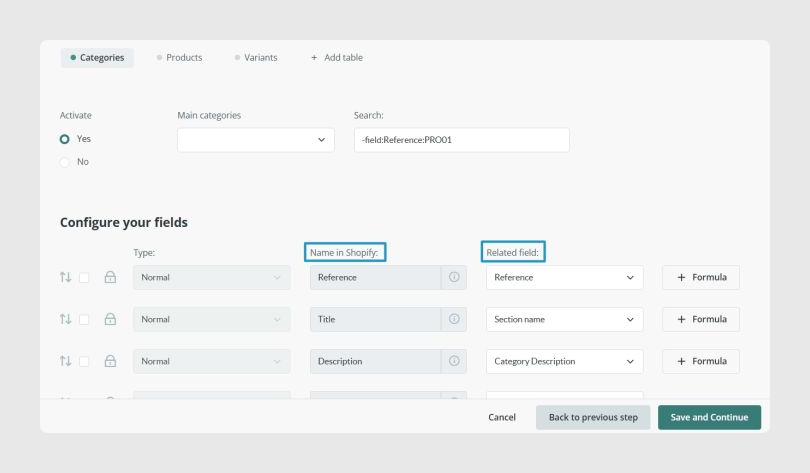
The Output data tab is divided into three sections: Categories, Products, and Variants.
When mapping fields, keep these rules in mind:
- The Shopify Name column on the left uses predefined names for basic fields. These names cannot be changed because they maintain compatibility with Shopify.
- The rest of the fields must follow the expected naming convention, depending on the field type or whether it is a metafield.
- The Related Field column on the right links each Shopify field to the corresponding PIM field.
- If a field should not be mapped directly, you can assign empty field and use a formula instead.
To send variants, you must add at least one variant attribute in the Variants tab, such as Color or Size. Shopify supports up to 2048 variants per product and a maximum of 3 attributes per variant.
Connection rules between Sales Layer and Shopify
- All products created in Sales Layer are created in Shopify and linked from that moment onward.
- If you want to connect preexisting Shopify products by SKU, the channel only links them when they have no variants and both products share the same SKU.
- When the channel is connected to an existing Shopify store, it ignores preexisting items and only edits products coming from Sales Layer by searching for their SKUs in Shopify.
Once the field mapping is complete, click Save and Complete. The new connector will then appear in your account’s connectors.
Was this article helpful?
That’s Great!
Thank you for your feedback
Sorry! We couldn't be helpful
Thank you for your feedback
Feedback sent
We appreciate your effort and will try to fix the article