Categories
In BigCommerce, the Visibility field can be used to enable or disable a category. If it is enabled, it will be displayed in the store. If it is disabled, it will not be shown.
To map this field from Sales Layer, use the Is Visible field in the connector:


It can be mapped with the following values:
- boolean false/true
- text 'false', '0', 'no' or 'true', '1', 'yes', 'si', not case-sensitive
- number 0 or 1
Products
In BigCommerce, the Visibility field can be used to enable or disable a product. If it is enabled, it will be displayed in the store. If it is disabled, it will not be shown.

To map this field from Sales Layer, use the Visible field in the connector:

It can be mapped with the following values:
- boolean false/true
- text 'false', '0', 'no' or 'true', '1', 'yes', 'si', not case-sensitive
- number 0 or 1
Variants
In BigCommerce, the Purchasable field can be used to enable or disable a variant. If it is activated, it will be displayed in the store. Otherwise, it will not be shown.
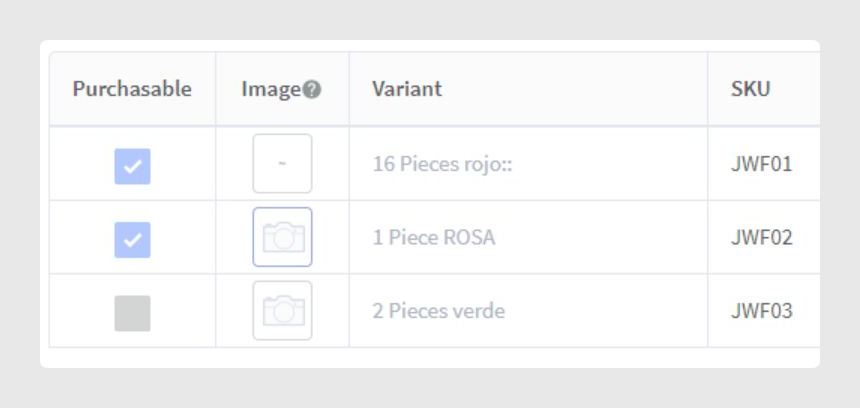
To map this field from Sales Layer, use the Enabled field in the connector:

It can be mapped with the following values:
- boolean false/true
- text 'false', '0', 'no' or 'true', '1', 'yes', 'si', not case-sensitive
- number 0 or 1
Storefronts management
There is also storefront management:
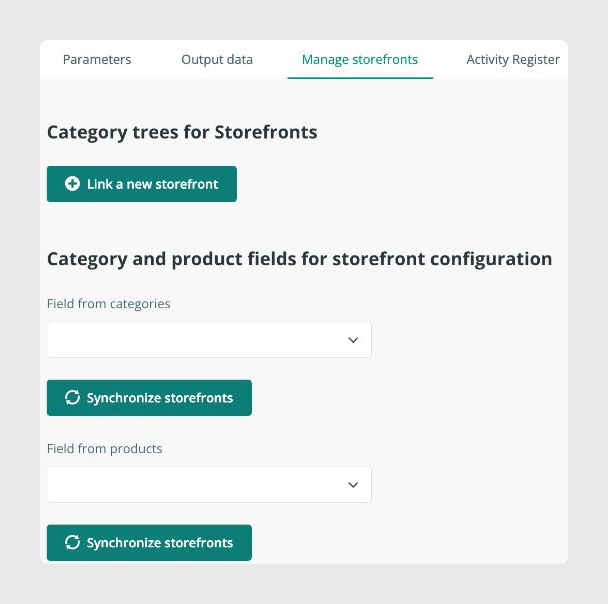
In the first part, you can link a category tree to each storefront you want to synchronize. All categories descending from the selected category will be sent for synchronization.
- If no storefront is linked, only the first one in BigCommerce will be managed with the general category tree in Sales Layer, always considering the filters on the categories tab.
- If there is no valid category for a storefront, no synchronization will occur for that storefront, and the products will not be linked to any category belonging to that storefront.
- You can add a storefront and link it to the Full category tree when you do not want to filter the tree starting from any category but want to specify a storefront.
In the second part, you can specify a relationship field with storefronts for categories and products. If a storefront is not selected in the storefront field of a product that is selected in the first part, that product will appear unlinked from that storefront.
- If a category does not have a storefront linked in the storefront category tree, it will not be sent.
- If a product does not have storefronts, it will still be sent, but it will not be linked to any storefront in BigCommerce, only to categories.
Disabling/Enabling items in BigCommerce
The connector disables items during the synchronization process in the following moments:
- During data reading from the API. It will return elements that do not meet the connector filters, such as tags, root category filter, or Sales Layer status, as deleted, and the connector will disable them.
- During storefront filtering. When a category is outside the tree filter, or its storefront field does not comply with the linked trees, it will be disabled. Products linked to this category will be reviewed and unlinked. If the product does not have at least one linked category, it will be disabled. Variants whose parent has been disabled will be disabled too.
Elements are enabled in BigCommerce when they do not arrive as disabled from the API or the storefront filtering process, and their status is not marked as disabled. If the status field is not assigned, the element will be enabled when synchronized, either upon creation or when updated when linking its Sales Layer credentials.
Limitations
- If the parent of a category is not exported or is filtered by storefronts, it will be changed to 0, and this category will be placed at the first level.
- A product must always have at least one valid category.
- A variant must always be linked to a product.
- Storefront relationship fields for categories and products must be filled from the connector storefront tab, not manually. The process assigns a unique identifier to the storefront name, corresponding to the storefront ID in BigCommerce.
Possible scenarios
- What happens if a product that has been previously synchronized is sent again without being in any category? The product category is removed, and the product remains visible without belonging to any category, or the product is disabled. If an orphaned product arrives, it will be synchronized without categories. The category is only sent for deletion if it arrives that way from Sales Layer, not because it was linked to a BigCommerce product.
- What happens with storefront filters in a connector that has not been configured with storefront or field relationships? If there are no configured trees, it will work with the first one only, as if the store did not have MSF enabled. The categories will not be filtered, and all will be sent, always considering the filters on the categories tab. Since there will be no configured storefront field either, all categories and products will be entered, and no element will be discarded during this process.
- A connector is configured with only one storefront, but no relationship fields for products or categories are linked. A synchronized product belongs to a category in the tree selected for that storefront. Later, that category is removed from the product. Would the product and category be disabled in BigCommerce? If the category is no longer part of the filters, it would be marked for disabling, and therefore its product as well, provided it does not have other valid linked categories.
- If a connector does not have synchronized storefronts but has the storefront field for categories, what happens? The storefront to which the data will be synchronized will be the first one, and those categories that have this storefront assigned in the field will be synchronized. The rest will be discarded or disabled if they have been synchronized previously.
- If a storefront is unlinked from the connector, are all its previously synchronized elements unlinked? No. Since the storefront ID is not in the parameters, it remains as it is and is not modified.
- What happens if a product is sent with the linked storefront field but no storefront is selected? Visibility does not depend on storefronts. The product can be visible or not, but it applies to all storefronts at once. In this case, the product will be visible and linked to its corresponding categories, but not assigned to any storefront.
- What happens to an already synchronized product when all its categories are removed or unlinked? The product is deactivated in BigCommerce because the API only returns products for modification when they have associated categories.
Considerations
- Do not link with the status field of Sales Layer, as it has internal values that do not correspond to the values expected by the BigCommerce API. In addition, the Sales Layer status is used as a filter in the Parameters tab and is usually used to manage whether elements arrive to modify or disable.
- The connector does not delete any item in BigCommerce, except for one case: the BigCommerce API does not allow altering configurable attributes that link products and variants. Therefore, the product variants will initially be deleted, then its attributes will be changed, and finally its variants will be regenerated.
- If you do not wish to disable any item in BigCommerce automatically, contact technical support.
Was this article helpful?
That’s Great!
Thank you for your feedback
Sorry! We couldn't be helpful
Thank you for your feedback
Feedback sent
We appreciate your effort and will try to fix the article