The Sales Layer plugin offers tools you can use when you need to analyze problems, detect errors, and manage logs.
To access these tools, go to Sales Layer in your Magento store and select Tools.
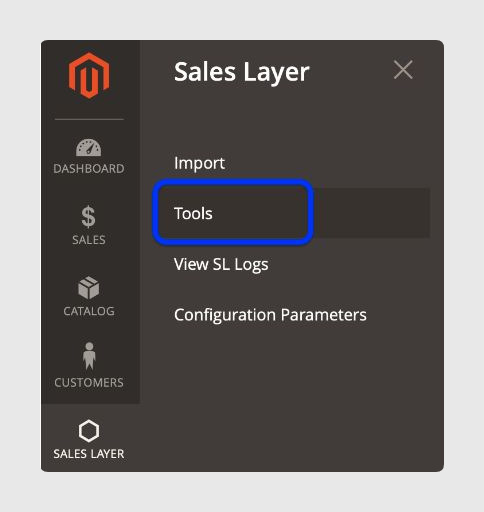
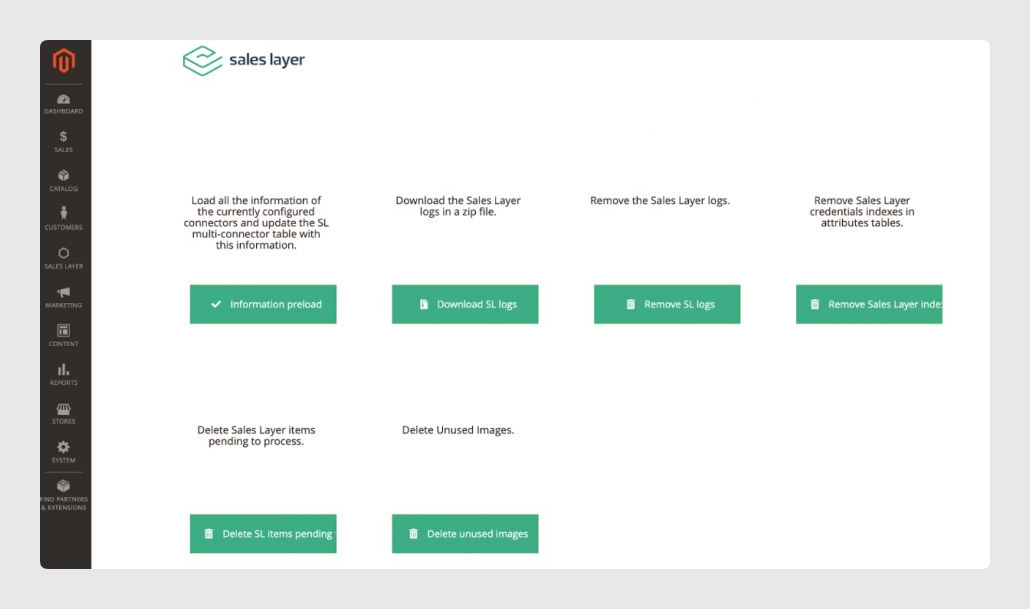
The tools available are:
- Information Pre-load: loads all information from the currently configured connectors and updates the Sales Layer multi-connector table with this information. This table maintains the Sales Layer connector IDs and their correlation with the items included in each of them, so if you disable an item in one connector but it is still active in another, it will not be disabled in Magento. The synchronization currently keeps this table updated, but if the table is deleted, you can restore it with this button.
- Download Sales Layer Logs: downloads the logs in a ZIP file.
- Remove Sales Layer Logs: removes the logs from your Magento servers.
- Remove Sales Layer indexes: removes Sales Layer credentials indexes in the attribute tables. These are the Sales Layer key fields described in the Credentials section under the Magento configuration.
- Delete Sales Layer items pending process: deletes Sales Layer items pending processing. This can be useful when identifying problems during a synchronization.
- Delete unused images: deletes unused images. Unused images are unrelated images, which can result from modifying the Sales Layer-Magento connector configuration when trying to remove images from items.
Was this article helpful?
That’s Great!
Thank you for your feedback
Sorry! We couldn't be helpful
Thank you for your feedback
Feedback sent
We appreciate your effort and will try to fix the article