Once all parameters and mappings have been configured, the Download tab provides access to the final exported files.
Depending on the connector configuration, you may see:
- A single merged CSV with the Parent-Child structure.
- Additional CSV files for optional tables.
- A ZIP file containing all exported tables.
- A preview of the most recent export.
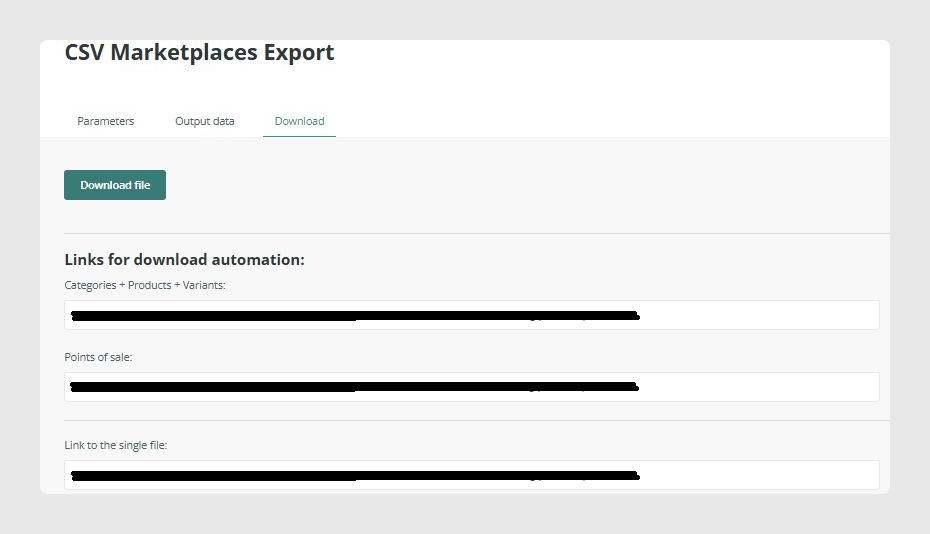
1. Single download link
The connector produces one single unified CSV file containing:
- Categories, if enabled and merged.
- Products, as Parent rows.
- Variants, as Child rows.
This single file represents the complete export dataset for marketplaces that require a consolidated Parent-Child structure.
This is the most common setup for feeds used in Amazon Seller Central, Mirakl marketplaces, Lengow, and other platforms requiring multi-variation products.
The combined file ensures that:
- All information appears in the correct order.
- Parent rows, if enabled, appear above their Children.
- No additional processing is needed.

2. Separate download links for additional tables
If the connector includes extra tables, such as Points of Sale or custom entities, each table will generate its own separate CSV file.
These appear as additional links under the Download tab. Whether they appear separately or as part of the merged file depends entirely on which tables are activated.

3. ZIP download link (Download all)
At the bottom of the Download tab, you will always find a Link to a single file.
This creates a ZIP archive containing:
- All exported CSV files.
- All required images and files inside the ZIP if the Pack files in ZIP option is enabled.
- Any optional tables included in the connector configuration.

Was this article helpful?
That’s Great!
Thank you for your feedback
Sorry! We couldn't be helpful
Thank you for your feedback
Feedback sent
We appreciate your effort and will try to fix the article