To send variants to Shopify, there are several rules that must be taken into account.
Synchronization rules
Rule 01
If the product has no variants, all mandatory information must be configured in the Products tab within the connector.
Rule 02
If both products and variants exist and repeated fields are detected, the values of the variants will prevail.
Rule 03
Each product or variant must have a unique SKU that identifies it. The connector uses the SKU as the main reference to locate products and variants in Shopify. If the connector detects more than one product or variant with the same SKU, unexpected behavior may occur, such as the creation of duplicates or the overwriting of incorrect items.
Rule 04
Each variant of a product must have a value assigned for all defined variant attributes. If any of the attributes has no content, that attribute will not be synchronized for any of the variants involved. If that empty attribute already exists in Shopify, it will be deleted.
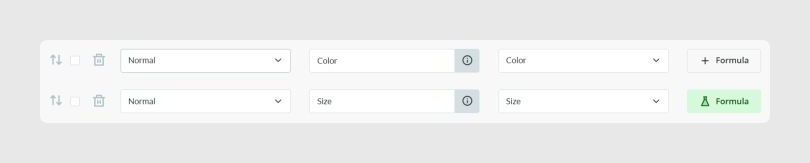
In the example above, the fields Color and Size are being sent as variant attributes. Based on that rule:
- If variant 1 has values in both fields, Color and Size, it is created in Shopify.
- If variant 2 sends only one attribute, for example Color, and the second one has no content, for example Size, that second attribute will not be synchronized in Shopify.
- If the attribute already exists in Shopify and it is now sent empty, it will be deleted from Shopify, because the data coming from Sales Layer always overwrites differences in Shopify to maintain data integrity.
- Following the same logic, if a variant has the attributes Color, Size, and Material in Shopify, and the connector now sends only Color and Size, the Material attribute will be deleted from Shopify.
Field correlation
To synchronize variants, the minimum required information must be sent through the mandatory fields:
- title: variant name
- sku: reference used for the internal control of the connector
In addition, as mentioned in the rules above, at least one attribute per variant must be sent, for example color or size.
Other fields that can be mapped in Variants are the following:
- price: price, accepts decimals
- cost_per_item: manufacturing price or similar
- presentment_prices: price per market and currency sent through a table-type field
- taxable: boolean or text field
- true, yes, or sí: the product is subject to tax
- false or no: the product is tax-free
- images: variant image. Shopify only allows one image per variant. If several are sent, only the first one will be associated.
- variant_alt: ALT attribute of the variant image
- requires_shipping: boolean field. Use true for a physical product that requires shipping. Otherwise use false.
- weight_unit: dropdown menu of weight units. Allowed units are g, kg, lb, and oz.
- Previously this was managed in the grams field. It is kept in the connector for backward compatibility, but its use is no longer recommended.
- The weight_unit field does not work if the grams field is active.
- It cannot be mapped with a list-type field. If you want to send it from that same source, map it as empty in the connector and apply a formula.
PRINT("list_type_field")- weight: weight field, supports decimals. Use it when the product is marked as a physical product with requires_shipping.
- Previously this was managed in the grams field. It is kept in the connector for backward compatibility, but its use is no longer recommended.
- The weight field does not work if the grams field is active.
- template_suffix: the product theme or template. One of the existing Shopify values must be sent, and the themes must already be created or purchased from Online Store > Themes.
- barcode: barcode
- country_code_of_origin: configurable region or country of origin attribute for customs control
- province_code_of_origin: province of origin code according to ISO 3166-2, for example ES-V or FR-IDF
- harmonized_system_code: trade code of the item, usually 6 digits
- country_harmonized_system_codes: same behavior as the fields country_code_of_origin and harmonized_system_code
- status: status field. Check the specific rules in the status and visibility configuration when needed.
To manage inventory, the following fields must also be taken into account:
- inventory_quantity: stock, depending on the location
- inventory_policy: defines whether customers can place orders when the item is out of stock
- tracked: enables stock tracking, previously named inventory_management
Sort variants
The connector allows you to customize the order of variants by following these steps.
Step 1. Add the field to be sorted in the Variants tab within the connector.
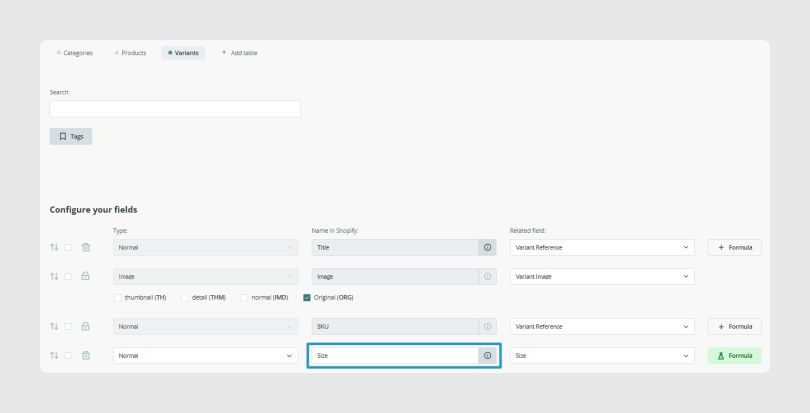
Step 2. Add the sort_order field in the Products tab of the connector.
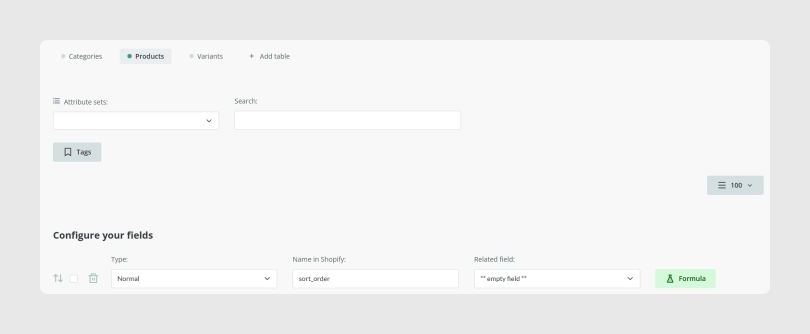
Step 3. Insert the PRINT formula according to the order you want to apply.
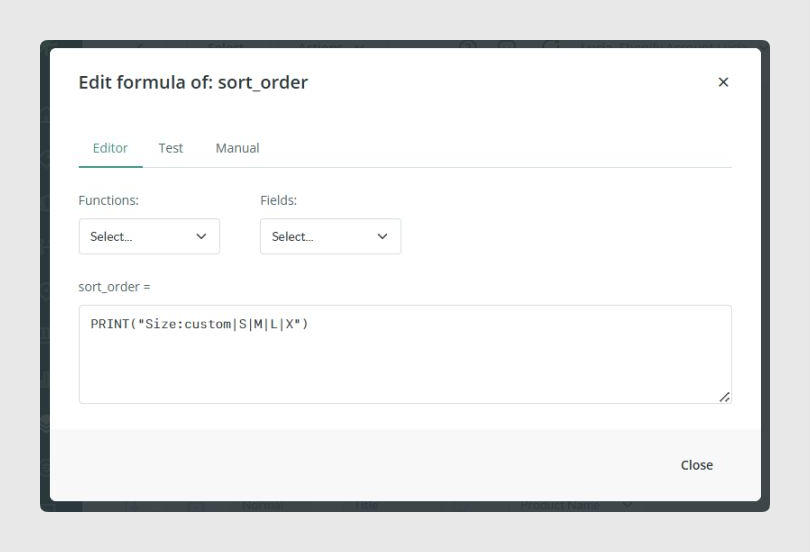
To create a custom order, the formula must follow this syntax:
PRINT("field:custom|option1|option2")Applying it to the previous example, where the order is based on the Size field, the final formula would be:
PRINT("Size:custom|S|M|L|XL")The system follows the custom order only for the options specified in the formula. Because of that, it is important to add all possible values of the field so the expected order is fully applied. Any option not included will keep its original order.
You can also use one of the predefined orders by replacing the order type in the formula. For example:
PRINT("Size:asc")Available predefined orders are:
- alpha-asc: alphabetically ascending, A to Z
- alpha-desc: alphabetically descending, Z to A
- best-selling: by best-selling products
- created: by ascending creation date, newest first
- created-desc: by descending creation date, oldest first
- price-asc: by ascending price, low to high
- price-desc: by descending price, high to low
Was this article helpful?
That’s Great!
Thank you for your feedback
Sorry! We couldn't be helpful
Thank you for your feedback
Feedback sent
We appreciate your effort and will try to fix the article