The information required for products to be sent to Shopify is defined through these mandatory fields:
- title: Product name.
- body_html: Product description.
- sku: Product reference, used for Sales Layer internal control.
Important note about product fields
- Some of the fields listed in the Products tab actually belong to the Shopify ProductVariant entity.
- This behavior is intentional. Shopify always creates at least one variant per product, called Default Title, and these variant-level fields are made available here for compatibility with stores that do not manage real variants.
- If your products do have variants, it is strongly recommended to map price and inventory-related fields, such as presentment_prices, sku, barcode, and inventory_quantity, in the Variants tab instead.
- Before changing mappings related to variant fields, test them in a staging environment to verify correct synchronization, especially when using Shopify Markets, where pricing and availability are managed per variant and market.
The basic fields that appear in the connector by default are not strictly necessary for sending products to Shopify, but they are useful for managing information:
- price: Item price. Supports decimals.
- compare_at_price: Corresponds to the product’s previous price. The value in compare_at_price must be higher than the current price.
- Send 0 to remove the price comparison and leave only the current price.
- Any number greater than 0 corresponds to the previous price.
- cost_per_item: The manufacturing or similar cost.
- taxable: Boolean or text value.
- true or yes: the product is subject to tax.
- false or no: the product is tax-exempt.
- handle: URL identifier. This is the last part of the product-specific URL and is used for SEO. If it is not sent, Shopify creates one automatically.
- seo_title: SEO title.
- The connector still keeps the field metafields_global_title_tag for backward compatibility, but it is no longer recommended.
- The recommended method is to use seo_title.
- Do not map both metafields_global_title_tag and seo_title at the same time.
- seo_description: SEO description.
- The connector still keeps the field metafields_global_description_tag for backward compatibility, but it is no longer recommended.
- The recommended method is to use seo_description.
- Do not map both metafields_global_description_tag and seo_description at the same time.
- requires_shipping: Boolean field. True corresponds to a physical product that requires shipping. Otherwise use false.
- weight_unit: Dropdown menu of weight units. Allowed values are g, kg, lb, and oz.
- Previously this was managed in the grams field. It is still supported in the connector for backward compatibility, but it is no longer recommended.
- The weight_unit field does not work if the grams field is active.
- It cannot be mapped with a list-type field. If you want to send it from the same source, map it as empty in the connector and apply a formula.
PRINT("list_type_field")- weight: Weight field. Supports decimals. Use it only if the product is marked as a physical product with requires_shipping.
- Previously this was managed in the grams field. It is still supported in the connector for backward compatibility, but it is no longer recommended.
- The weight field does not work if the grams field is active.
- sort_order: Customizes the order of variants. Important: it is mapped at the product level.
- vendor: Corresponds to the supplier of the products for sale.
- product_type: Product type or Attribute Set. Each product can only have one product type.
- template_suffix: The product’s theme or template. You must send one of the existing values, and the themes must be created or purchased in advance in Online Store > Themes.
- country_code_of_origin: Configurable attribute for region or country of origin for customs control.
- province_code_of_origin: Province of origin code according to ISO 3166-2, for example ES-V or FR-IDF.
- harmonized_system_code: Customs tariff code for imports between countries, usually between 6 and 13 digits.
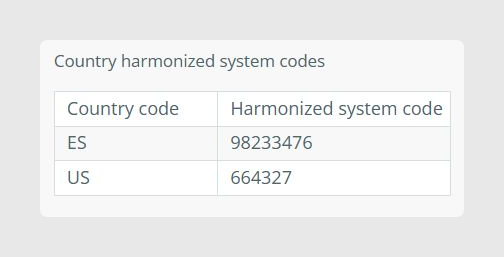
- country_harmonized_system_codes: Same behavior as country_code_of_origin and harmonized_system_code. These codes can be specialized by country. This is a table-type field with the following structure.
- status: Product status.
- V = Visible
- D = Draft
- I = Invisible
Fields for managing sales channels
The field published_scope allows you to manage product availability across different sales channels already created and enabled in Shopify.
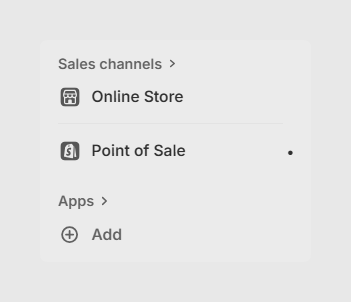
From Sales Layer, the desired value can be sent by mapping it with a list-type field or a short text field with options separated by |. Otherwise, it is possible to map the field as empty and apply a formula like this:
PRINT("web|global")
Accepted options:
- all: Publishes the product in all defined sales channels in Shopify.
- web: Publishes the product in the Online Store sales channel.
- global: Publishes the product in the Point of Sale sales channel.
- This is the default value if published_scope is not mapped.
- This is also the default value if published_scope is disabled in the connector.
- social: Publishes the product in the Facebook & Instagram, Google, and YouTube sales channels.
- button: Assigns the Buy Button sales channel.
- third-party: The connector does not publish or unpublish items in any sales channel. Use this if you do not want to change sales channel settings or if they are managed externally from Shopify or external apps.
- Specific channel name: Publishes the product in a custom sales channel.
- persist: Lets you manage specific channels from the connector while keeping other channels unchanged as they already are in Shopify. For example:
PRINT("web|persist")- No value provided: If the published_scope field is mapped but no value is provided, the connector unpublishes the product from all sales channels.
- Activation by dates: Lets you activate channels on a specific date using the syntax Channel:YYYY-MM-DD. Example:
PRINT("Online Store:2025-02-11 | Facebook & Instagram:2025-01-15")Inventory management
To manage inventory, these fields must be considered:
- inventory_quantity: Stock, depending on location.
- inventory_policy: Defines whether customers can place orders when the item is out of stock.
- tracked: Enables inventory tracking. Previously this was inventory_management.
Media fields
This set of fields collects information about images and files linked to the product:
- images: Product image. In Sales Layer it is mapped with an image-type field.
- product_alt: Assigns an ALT attribute to each product image.
- media_video: Sends videos or 3D images hosted in Sales Layer.
- media_video_alt: ALT attribute for files sent through media_video.
- media_external: Sends external videos that are not hosted in Sales Layer.
- media_external_alt: ALT attribute for files sent through media_external.
- media_order: Sets the order of the media files sent by the connector.
Markets fields
To work with Shopify Markets information, you must use table-type fields in the following way:
- markets: Enables markets for the product.
- presentment_prices: Indicates prices by market or currency for the product. This is provided in a table composed of required and optional information.
Was this article helpful?
That’s Great!
Thank you for your feedback
Sorry! We couldn't be helpful
Thank you for your feedback
Feedback sent
We appreciate your effort and will try to fix the article