Before you start
Use this article as a quick starting point before working with the Sales Layer REST API. For the complete and current instructions, open the official Quickstart guide.
Open the official Quickstart guide
You need API access before you can make requests to the Sales Layer REST API. If you need an API key or have questions about access, contact Sales Layer Support or your account representative.
Prerequisites
Before making a request, make sure you have a Sales Layer account with REST API access, a valid API key, and a tool that can send HTTPS requests, such as cURL, Postman, or your integration runtime.
Base URL
All requests in the official documentation use the current Sales Layer API base URL:
https://api2.saleslayer.com
Build requests by adding the API path and any supported query parameters to this base URL. Use the official Base URL guide to confirm the current structure before implementing an integration.
Authentication header
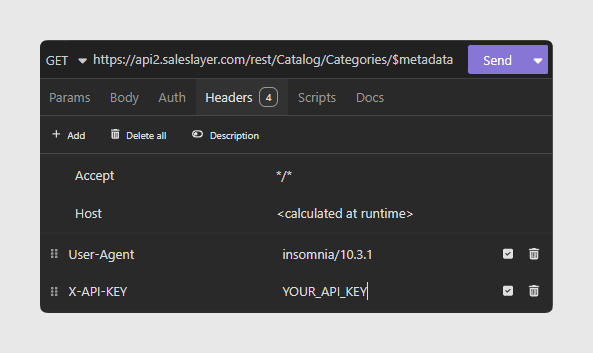
Send the API key in the X-API-KEY header.
X-API-KEY: YOUR_API_KEY
Do not include API keys in browser code, public repositories, screenshots, or customer-facing logs.
Example:
Make a first request
The official Quickstart guide starts with a small DAM request to verify authentication, connectivity, and response handling.
curl -X GET 'https://api2.saleslayer.com/dam/image?$top=10' \
  -H 'X-API-KEY: YOUR_API_KEY'
A successful request returns an HTTP 200 OK response with a JSON payload. If the request fails, check the status code and review the official Quickstart guide before continuing.
If your DAM does not contain any images yet, you can instead request the public metadata of the Catalog model:
curl -X GET 'https://api2.saleslayer.com/catalog/rest/Catalog/$metadata' \
  -H 'X-API-KEY: YOUR_API_KEY'
Where to continue
- Current limitations: check the current documented limitations.
- Quickstart: make a first authenticated request.
- Base URL: confirm the current base URL and path conventions.
- Authentication: review how to send credentials securely.
- API Reference: check available resources, parameters, and responses.
- Changelog: review the latest updates before changing an existing integration.
Was this article helpful?
That’s Great!
Thank you for your feedback
Sorry! We couldn't be helpful
Thank you for your feedback
Feedback sent
We appreciate your effort and will try to fix the article