Categories
The following fields can be found in the Category Details tab within a specific category.
Category Details
- Name: Category display name. Mapped with the Category name. A string is sent.
- URL: The unique URL path differentiator. Mapped with the unique text of your choice. This text will appear in the URL when you open the category. A string is sent.
- Description: Category description. Mapped with the Category description. A big string is sent.
- Parent Category: Category under which the current category is placed. Automatically mapped with the corresponding parent category.
- Sort Order: Position number of the category within the parent category. Mapped with the order field. An integer or string is sent.
- Image: Category image. Mapped with the Category image. The array is sent with status, unique ID, and download link of the corresponding picture size cut.
Product Categories Menu
- Is Visible: the Visible toggle button in the Product Categories menu. Mapped with the corresponding boolean visibility field. Boolean is sent. Strings such as Yes/No and True/False are also accepted.
Search Engine Optimization
- Page Title: Home Page Title. Mapped with the name of your choice. If blank, the Category name will be used. A string is sent.
- Meta Keywords: Content descriptive keywords. Mapped with the selection of keywords separated by commas. A string is sent.
- Meta Description: Summary of the category shown in web searches. Mapped with a brief description of the category. Sent in string or big string format.
- Search Keywords: Keywords used in a web search of the category. Mapped with the selection of keywords separated by commas. Sent in string or big string format.
Products
Basic Information
- Name: Product Name. Mapped with the name. A string is sent.
- Default Price: Default price, tax excluded. Mapped with the price without tax. The number is sent. Also present in the Pricing section.
- Product Code/SKU: SKU field. Mapped with the item reference. A string is sent.
- Weight: Weight field or tab. Mapped with the weight in kilograms. The number is sent. Also present in the Dimensions & Weight section.
- Brand: Brand field. Mapped with the brand. A string is sent.
- Visible: Visible on storefront checkbox. Mapped with the corresponding field. Boolean is sent.
Pricing
- Tax Class: Tax Class dropdown list field. Mapped with the corresponding Tax class field. A string is sent. Accepted values are those defined in Settings > Tax Settings > Tax Class Settings.
Pricing > Advanced Pricing
- Cost Price: Cost field. Mapped with the cost price. The number is sent.
- Retail Price: MSRP field. Mapped with Retail price. The number is sent.
- Sale Price: To match this field, send a value in the Sale Price field in the connector. Number is sent.
- Product Tax Code: Tax Provider Tax Code field in the Pricing tab. Mapped with the corresponding tax code. String is sent.
- Bulk Pricing Rule Qty Min 1: Minimum quantity. Number is sent.
- Bulk Pricing Rule Qty Max 1: Maximum quantity. Number is sent.
- Bulk Pricing Rule Type 1: Discount type. Accepted values are percent, fixed, and price.
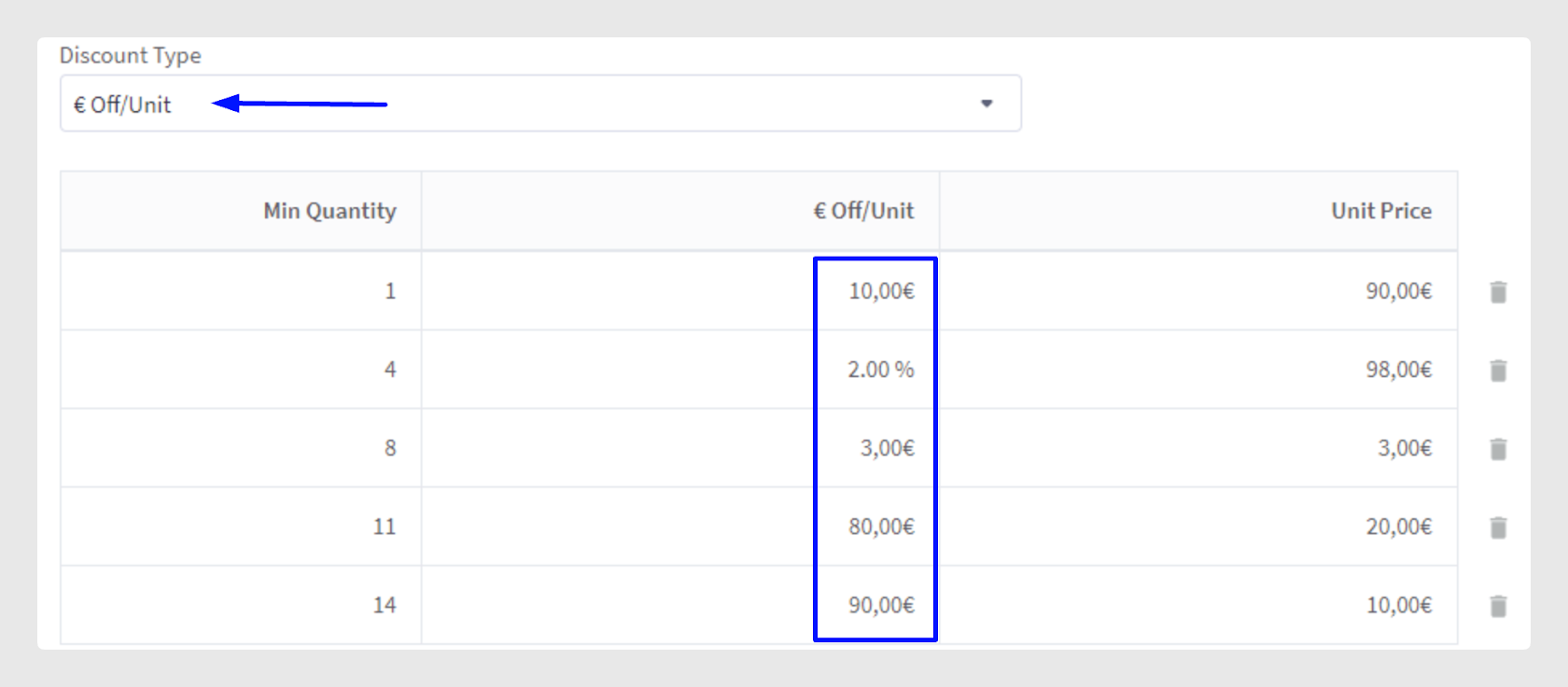
- Bulk Pricing Rule Amount 1: Unit price. Mapped with the amount of € or %. Number is sent.
Dimensions & Weight
- Width: Width field.
- Height: Height field.
- Depth: Depth field.
Description
- Description: Description field. Mapped with the Description field. A big string is sent.
Shipping details
- Free Shipping: Free Shipping checkbox. Mapped with the corresponding field. Boolean is sent.
- Fixed Shipping Price: Fixed Shipping Price. Mapped with the shipping price. Number is sent. This field will be disregarded if Free Shipping is marked.
Images & videos
- Product Images: Image. Mapped with the image field. The array is sent with status, unique ID, and download link of the corresponding picture size cut.
- Product Image descriptions: Description. Mapped with the image description field. The table is sent with picture names in the first column and the corresponding descriptions in the second column.
- YouTube Videos: Video. Mapped with the field containing the YouTube video link. String is sent.
Inventory
- Tracking Method: Track inventory. Mapped with the tracking method field. Accepted values are variant and product.
- Stock and Low Stock: Mapped with the stock and low stock field. Number is sent. If Tracking Method = product, stock is used in the Inventory tab. If Tracking Method = variant, stock is used in each variant.
Product Identifiers
- Global Trade Item Number: GTIN. String is sent.
- Manufacturer Part Number: MPN. String is sent.
- Product UPC/EAN: UPC/EAN. String is sent.
- Bin Picking Number: BPN. String is sent.
Storefront Details
- Warranty Information: A big string is sent.
- Search Keywords: A list of comma-separated values is sent.
- Availability: Purchasability or availability text. String is sent.
- Featured Product: Boolean is sent and will mark or unmark the Featured Product star.
- Sort Order: Number is sent corresponding to the position of the item.
- Condition: Accepted values are new, used, and refurbished.
Purchasability
- Preorder Message and Release Date: Visible if the preorder checkbox is checked in the Purchasability section. String and Date are sent.
- Remove pre-order status on this date: Boolean is sent.
- Minimum Purchase Quantity: Number is sent.
- Maximum Purchase Quantity: Number is sent.
Gift Wrapping
- Gift Wrapping: Accepted values are any, none, or list.
- Gift Wrapping Options List: These options must have been previously created. A list of comma-separated values is sent.
Search Engine Optimization
- Page Title: String is sent.
- Meta Keywords: The version used during the creation of the source article does not have this field.
- Meta Description: BigString is sent.
- URL: Product URL. Mapped with the handle that will appear at the end of the item URL. String is sent.
Open Graph Sharing
- Object Type: Object type dropdown.
- Related Products: Related products in the Related Products tab.
Variants
Products Variations tab
All the fields below are situated in the Variants section table and can be chosen to view or hide.
- SKU → SKU
- UPC/EAN → UPC/EAN
- Cost → Cost
- Price → Default Price
- Image → Image
- Weight → Weight
- Width → Width
- Height → Height
- Depth → Depth
- BPN → Bin Picking Number
- Enabled → Purchasable
- Current Stock Level → Stock if managed at the variant level
- Purchasing Disables Message
Considerations
- For Sale Price, once a value has been sent, to delete it, the value 0 must be sent. If the field is sent with no content, the connector will not review that field and will not remove the initial value.
- If you select the discount type directly on the BigCommerce platform, you will see that you cannot select more than one type. Through the API, it is possible to send more than one type, even though you see only one type selected.
- To add more Bulk Pricing Rules, read the relevant article in the Support Centre.
- It is possible to send custom fields in the connector.
- Variant fields can be hidden. Check the Edit Columns option in the Variants section. To create variants in BigCommerce, it is mandatory to send at least one configurable field apart from the previous fields.
Was this article helpful?
That’s Great!
Thank you for your feedback
Sorry! We couldn't be helpful
Thank you for your feedback
Feedback sent
We appreciate your effort and will try to fix the article