This section describes how the connector organizes and merges data during export, and how the available parameters influence the final CSV output.
1. Export model: Categories + Products + Variants merged
When the connector is configured with merging options enabled, it produces a single, consolidated table that contains:
- Category information for each product, if merged.
- Product (parent) information.
- Variant-level information.
This results in a dataset where every row is:
- A complete marketplace-ready record.
- Self-contained.
- Fully enriched with parent, variant, and category data.

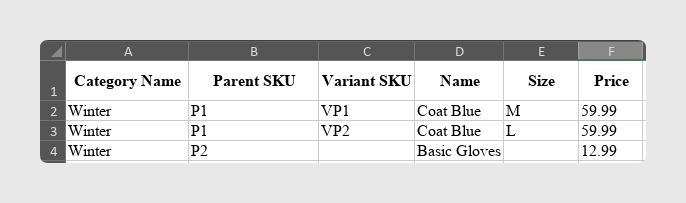
Example A: Combined Category + Product + Variant Output
When Categories are merged:
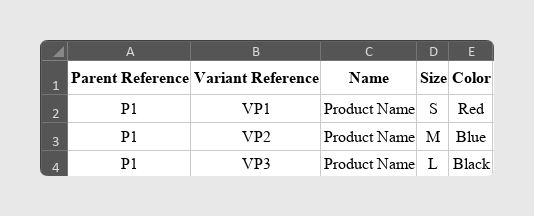
Example B: Product with 3 Variants
PIM Input:
- Product P1
- Variants: VP1, VP2, VP3
Connector Output (merged):
2. Behavior of standalone Products
Standalone Products without Variants
If a product has no variants:
- It is exported as a single Parent record.
- All Variant-only fields remain empty.
- The row appears as a standard simple product.
This is especially important for catalogs that include both variable products and simple products.
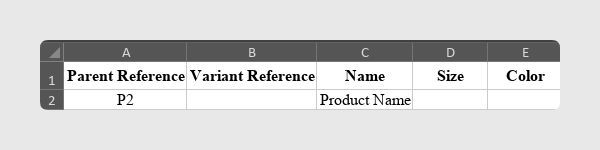
Example C: Product without Variants
PIM Input:
- Product P2
- No variants
Connector Output:
3. When to use Add parents to variants
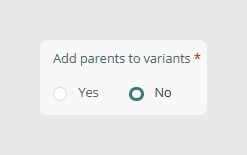
The parameter Add parents to variants generates an extra Parent row for products that contain variants.
Common Use Cases
Some marketplaces require a Parent record with no variant attributes, Type = Parent, and identifying information only, followed by Child rows for each variant.
In these cases, the feed must include:
- P1 (Parent)
- P1 + VP1 (Child)
- P1 + VP2 (Child)
- P1 + VP3 (Child)
This option is recommended when you need to display products as a single list with grouped variations, or when you want to distinguish Parent and Child rows using formulas such as IS_FUSION_VARIANT_PARENT().
It is not recommended when the marketplace only expects variant rows, when the target platform does not support hierarchical product models, or when you want a strictly flat list of variants.
Was this article helpful?
That’s Great!
Thank you for your feedback
Sorry! We couldn't be helpful
Thank you for your feedback
Feedback sent
We appreciate your effort and will try to fix the article