The API lets you update stored fields using POST parameters.
To import or insert data through API requests, you need to configure an import connector.
Data structure
“input_data” = [
    “{table name}” = [
        [
            “REF” = “{unique record reference}”,
            “{field name}” = “{new field value}”,
            “{field name}” = “{new field value}”,
            ...
        ],
        [ … ]
    ],
    “{other table name}” = [
        ...
    ]
]Note: JSON import supports up to 50,000 items per call. You can also run the import from a CSV file.
{“input_data”:{
    “products”:”http://externaldomain.com/download/product_items.csv”,
    …
}
Import through FTP
Since API version 1.18, you can also specify FTP access when uploading a file.
{“input_data”:{
    “products”: [
        “URL”:”ftps://externaldomain.com/download/product_items.csv”,
        “user”: “FTP_user”,
        “password”: “FTP_password”,
        “port”: “FTP_port”
    ],
    …
}Warning: The FTP server must use a certificate signed by a certification authority. Self-signed certificates are not accepted.
Other parameters
| Parameter | Value | Explanation |
|---|---|---|
get_output_data | 0 or 1 | If you insert new data, the updated information is not returned unless you explicitly request it. |
get_affected_ids | 0 or 1 | Returns in the response the total number of affected items by table, for example: "items_affected":{"products":5}. |
To see the breakdown of new, modified, and deleted items, you need to call the corresponding function with the SDK:
- Call:
$SLConn->get_input_results() - Response:
Array ( [items_affected] => 7 [new_items] => 2 [updated_items] => 2 [deleted_items] => 3 )
Basic configuration
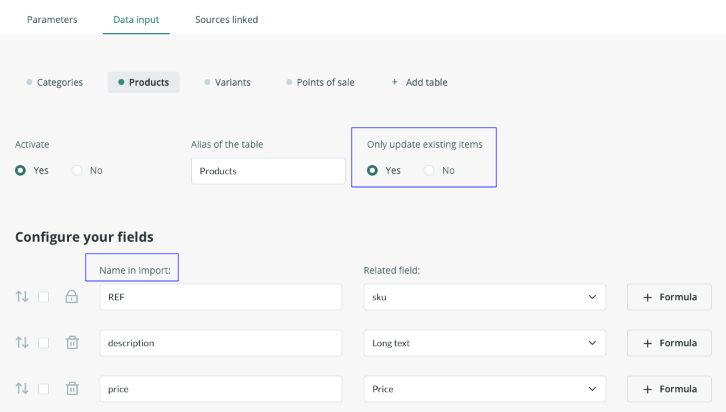
Field names will be the ones defined in the connector under Import name.
If you define a table alias, you must respect it when sending the data in the HTTP POST call.
The Only update existing items parameter works like this:
- Yes: only items that already exist in the PIM will be updated. New references will be discarded.
- No: both the creation of new items and the update of existing items will be allowed.
Deleting records through POST
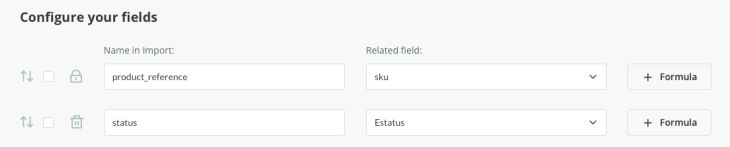
The most recommended way to delete data through a POST request is to send the item status with value X and map that field in the connector.
“input_data” = [
    “products” = [
        [
            ”product_reference” = “{record reference in Sales Layer}”,
            “status” = “X”
        ],
        …
    ]
]
In version 1.18, you can also delete records by creating a delete_data structure in the body of the POST call.
“delete_data” = [
    “{table name}” = [
        [
            “REF” = “{unique record reference}”
        ],
        …
    ],
    ...
]
Response and errors
The response to the data update request arrives inside the JSON or XML input_response parameter.
“input_response” = [
    “result” = (0 = no changes, 1 = update completed, 2 = update denied),
    “errors” = [
        0 = “{error description}”,
        {n} = …
    ],
    “items_affected” = [
        “{table}” = {number of modified fields}
    ]
]
Was this article helpful?
That’s Great!
Thank you for your feedback
Sorry! We couldn't be helpful
Thank you for your feedback
Feedback sent
We appreciate your effort and will try to fix the article