nuevoTestjavi

MACROS EXPERT
The Macros Expert is a specialized AI assistant has been implemented to help Sales Layer users create, validate, and optimize data transformation formulas (macros). This assistant guides users in applying real Sales Layer functions to clean, format, and automate product information during imports and exports, ensuring accuracy, consistency, and efficiency.
To use it, head over to the Channels tab, and go to edit the channel of your choice.
In the Output data tab, scroll down to the configure fields section.
When you click on the + Formula button, a pop-up window appears, where you can find the ‘Ask AI Expert’ Button. Clicking on this button will open a new ChatGPT Macros Expert tab.

You can give the AI assistant prompts that can help you build or review your formulas directly within Sales Layer.
For example, you can ask things like:
- Write me a formula a formula to retrieve the last modification date of my products and the product name
- “Create a formula to show the product name followed by its reference.”
- “Write a formula that only exports products with stock greater than zero.”
- “ I need a formula to retrive the last modification date of my products and the product name”
The Macros Expert will respond with the correct syntax using only official Sales Layer functions as shown below. It also explains why each function is used and gives you contextual examples, helping you learn while you work.
DATA MODEL EXPERT
The Sales Layer Data Model Expert is an AI assistant that enables users to analyze data, automatically generate complete templates, standardize structures across catalogs, and even review existing forms for errors. This tool saves time, ensures accuracy, and maintains consistent and manageable product data models.
To access the Data Model Expert AI tool, head over to the products tab and under Actions, click on edit forms. In the product forms editor, go to Actions again and click on import configuration. This opens a pop-up window where you can find the Ask AI Expert button which takes you to the ChatGPT Data Model Expert.

Example of a use case:
Prompt: “Prepare an .xly file to be imported as attribute sets in Sales Layer based on my product structure”. (include your product data in the prompt)
Response: It generates an xly structure based on the data you gave it as shown below. 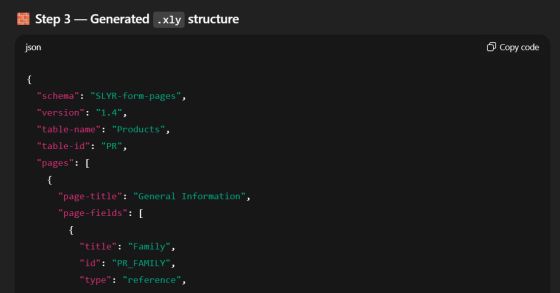
You can also ask it to give you a downloadable xly file which can then be imported into Sales Layer as shown below.