Parent-Child Specific Formulas
The CSV Connector for Marketplaces includes a set of special formulas designed to help you control the output of merged Product–Variant rows. The formulas can be used both in the Products tab and in the Variants tab.
These formulas give you full flexibility to determine:
- When a row represents a Parent or a Child
- How fields should behave depending on the row type
- How to hide or show certain products
- How to construct combined values (e.g., name, titles, identifiers)
These formulas only work when:
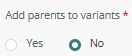
Add parents to variants is enabled (for Parent detection)
1. IS_FUSION_VARIANT_PARENT()
This formula returns true when the current record is a Parent of a variant
Example
IF(IS_FUSION_VARIANT_PARENT(), "Parent", "Child")
2. IS_FUSION_VARIANT_PARENT_FREE()
This formula returns true when the current row represents a standalone product, meaning it has no variants and it is the only row representing that product.
This distinguishes parent rows of variant groups from Simple (single) products that have no variants at all
Examples
- IF(IS_FUSION_VARIANT_PARENT_FREE(), "Single Parent", "Not Single")
- IF(IS_FUSION_VARIANT_PARENT(), CONCAT({Attributes set} , “ “, {Model}) , CONCAT({Attributes set} , “ “, {Model} , “ “, {Size}, “/“, {Color}))

