Home
  • English
    • Spanish
    • English

Anon User Header Menu

  • Sign In
  • Main topics
    • Getting Started
    • Using Sales Layer
    • B2B Integrations
    • Channels & Integrations
    • Updates
    • Enterprise Features
    • FAQS
  1. Channels & Integrations
  2. CSV Connector
  3. Output Data: Products
Purpose of this Guide
Understanding the Parent-Child Data Model
Overview
Parameters
Output Data: Common parameters
Output Data: Categories
Output Data: Products
Output Data: Variants
Output Data: Points of Sale
Add Table (Custom Entities)
Overview
How merged records are generated
Logic for combining Products + Variants
Precedence rules
Products without variants
Enabling “Add parents to variants”
Examples with tables
Parent-Child Specific Formulas
Downloading Files

Output Data: Products


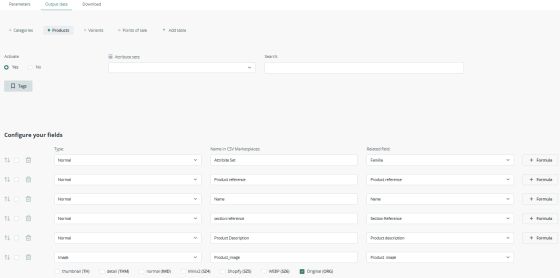
Available fields


The fields shown depend entirely on the PIM configuration.

Typically include:

  • Attribute Set
  • Product reference
  • Name
  • Section reference
  • Product Description
  • Product_image
Output Data: Categories
Output Data: Variants
Logo Sales Layer Visit Saleslayer.com
instagram Linkedin Youtube
Redribera
...