How the connector works
This section describes how the connector organises and merges data during export, and how the available parameters influence the final CSV output.
1. Export model: Categories + Products + Variants merged
When the connector is configured with merging options enabled, it produces a single, consolidated table that contains:
- Category information for each product (if merged)
- Product (parent) information
- Variant-level information
This results in a dataset where every row is:
- A complete marketplace-ready record
- Self-contained
- Fully enriched with parent + variant + category data

Example A: Combined Category + Product + Variant Output
When Categories are merged:
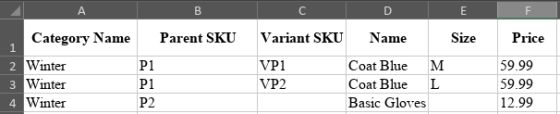
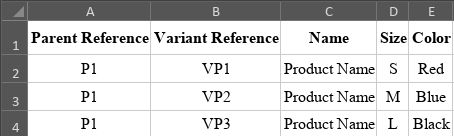
Example B: Product with 3 Variants
PIM Input:
- Product P1
- Variants: VP1, VP2, VP3
Connector Output (merged):
2. Behaviour of standalone Products
Standalone Products (without Variants)
If a product has no variants:
- It is exported as a single Parent record
- All Variant-only fields remain empty
- The row appears as a standard simple product
This is especially important for catalogs that include both:
- Variable products, and
- Simple products
Example C: Product without Variants
PIM Input:
- Product P2
- No variants
Connector Output:

3. When to use “Add parents to variants”
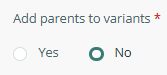
The parameter “Add parents to variants” generates an extra Parent row for products that contain variants.
Why is this needed?
Some marketplaces require:
- A Parent record with:
- No variant attributes
- Type = Parent
- Identifying information only
- Followed by Child rows (variants)
In these cases, the feed must include:
- P1 (Parent)
- P1 + VP1 (Child)
- P1 + VP2 (Child)
- P1 + VP3 (Child)
Recommended when:
- You need to display products as a single list with grouped variations
- You want to distinguish Parent and Child rows using formulas (e.g., IS_FUSION_VARIANT_PARENT())
Not recommended when:
The marketplace only expects variant rows
The target platform does not support hierarchical product models
You want a strictly flat list of variants

