Examples with tables
Example 1: Standard merge (no parent row)
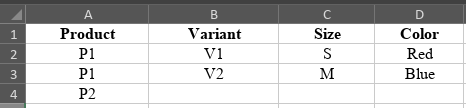
In this scenario, the connector is configured with Products and Variants merged, but the option “Add parents to variants” is disabled.
This means:
- Each variant generates one output row
- No standalone parent row is created
- Product-level values are inherited by each variant
- Variant fields override product fields where applicable
- Products without variants appear as single rows
PIM Input
Connector Output

Example 2: With “Add parents to variants” enabled
Here, the connector has Add parents to variants enabled.
In this mode:
- The connector generates one additional parent row for each product that has variants
- The parent row contains only product-level fields
- Variant rows continue to contain combined product + variant data
- Variant fields override product fields in variant rows
- Standalone products (without variants) still output as single parent rows
PIM Input

Connector Output

Example 3: Field precedence
This example illustrates how the connector decides which value to include in a field when the same output column is mapped in both Products and Variants.
- The rules are:
- Variant-level values override product-level values.
- If the variant value is empty (null or blank), the connector uses the product value.
- Parent rows (when “Add parents to variants” is enabled) always use only product-level values.
- Empty strings (“”) in the Variant tab count as intentional empties, meaning they override product values.
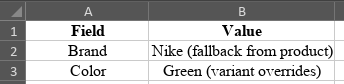
- In the illustrated scenario:
- The product has Brand = Nike
- The variant has Brand = "" (empty string)
- The variant has Color = Green
- The result will be:
- Brand = Nike (variant brand is empty, so product value is used)
- Color = Green (variant overrides product value)
This demonstrates how the connector ensures consistent, marketplace-ready data by applying structured priority logic.
Output